What Is Manychat? A Complete Guide for Beginners

What Is Manychat?
Manychat is a messaging automation platform. It helps businesses, creators, and marketers manage conversations with their audiences.
It can automatically reply to certain comments and messages. It can also send links, answer common questions, collect leads, and guide people through a conversation.
For example, imagine you post an Instagram Reel about a digital marketing guide. You ask viewers to comment with the word “GUIDE” to receive it.
Manychat can help send an automatic direct message to people who comment with the chosen keyword. The message can contain the guide link or instructions for getting it.
This can save time. It can also help you respond to more people without manually answering every message.
Manychat supports several messaging channels. These include Instagram, Facebook Messenger, WhatsApp, TikTok, Telegram, SMS, and email. The channels available to you depend on your plan and setup.
In simple terms, Manychat helps automate conversations so you can spend less time on repetitive replies and more time on your business.
Visit Manychat Official Website >>>
How Does Manychat Work?
Manychat works through triggers, automated messages, and conversation flows.
A trigger starts an automation. A message flow tells the system what to do next.
For example, a user might comment on your Instagram post. That comment can trigger a reply or a direct-message workflow, depending on how you set it up and the platform’s rules.

A typical workflow looks like this:
-
A person takes an action. They comment on a post, send a message, or interact with a supported feature.
-
Manychat detects the trigger. It checks whether the action matches your automation settings.
-
An automated message is sent. The message may answer a question or offer a resource.
-
The person responds. They may click a button, choose an option, or send another message.
-
The flow continues. Manychat follows the next step you created.
You can build simple workflows or more detailed ones. The right setup depends on your goal.
For example, a creator may use Manychat to deliver a free checklist. An online store may use it to answer product questions. A service business may use it to help people request an appointment.
Automation does not mean every conversation must be fully automatic. You can still handle questions that need personal attention.
Main Features of Manychat
Manychat offers tools for managing messages and automating common marketing tasks. The exact features depend on your plan, connected channel, and account settings.

1. Instagram Comment Automation
Instagram comment automation is one of Manychat’s key use cases.
You can set up an automation for selected posts or Reels. When someone comments with a chosen keyword, Manychat can help start a message flow.
For example, you could publish a post about email marketing tools. Then you could invite people to comment “TOOLS” to receive a resource.
The automation can send a relevant direct message based on your setup. This can make it easier to share resources and answer repeated requests.
Why it helps: You do not have to manually send the same link to every person who requests it.
2. Automated Direct Messages
Manychat can send automated direct messages when a supported trigger occurs.
These messages can welcome people, share information, or guide them to the next step.
For example, a fitness creator might send a workout checklist. A digital marketer might share a free marketing guide. An online store might answer a common product question.
The message should be relevant to the action the person took. Clear, useful messages are more helpful than sending people repeated sales pitches.
3. Automated Replies to Common Questions
Businesses often receive the same questions every day.
Customers may ask about prices, services, delivery, booking, or product details. Answering every question manually can take time.
Manychat can automate responses to supported questions and triggers. You can prepare answers in advance and guide people toward useful information.
For example, a service business might create options such as:
-
View services
-
Check business hours
-
Request a quote
-
Talk to a team member
The automation can direct people to the right information. Complex or unusual questions may still need a human response.
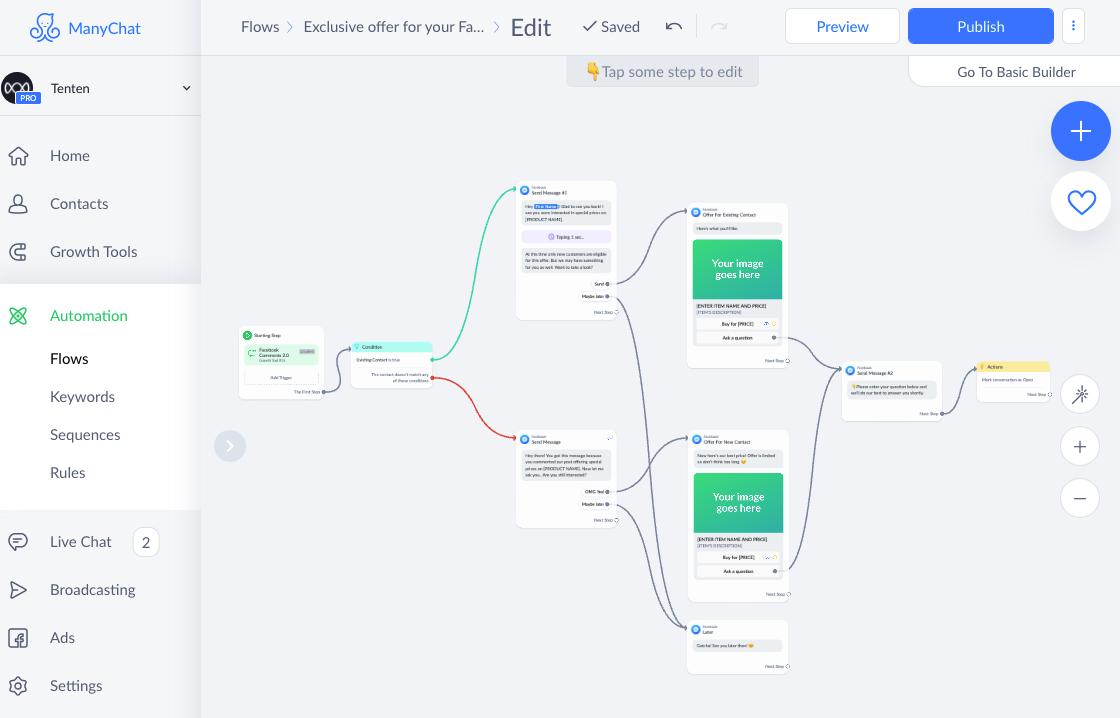
4. Visual Automation Builder
Manychat includes tools for building message flows.
You can plan the steps of a conversation and decide what happens after a person responds. You do not need to write every message as a separate manual reply.

A simple flow might look like this:
-
Send a welcome message.
-
Ask what information the person needs.
-
Show two or three options.
-
Send the relevant answer.
-
Offer a way to contact a person if needed.
Manychat also provides templates and guided automation options. These can help beginners start without building every workflow from scratch.
5. Lead Generation
A lead is someone who shows interest in a product, service, or offer.
Manychat can help businesses start conversations and collect information through supported workflows. Depending on the setup, this may include contact details or other useful information.
For example, a consultant could offer a free checklist. A person who requests it could then be guided through a short series of questions.
The goal is to make the next step easy for interested people.
Always explain why you need someone’s information. Collect only what is necessary, and follow the relevant privacy rules.
6. Contact Tags and Segmentation
Not every contact has the same interests.
Some people may want beginner guides. Others may want pricing information or product comparisons.
Contact tags can help organize people based on their interests or actions. Segmentation lets you group contacts for more relevant follow-up.
For example, an online business could use separate tags for people interested in:
-
Email marketing
-
Social media tools
-
Website services
-
Affiliate marketing resources
This can make communication more organized. Available contact-management features depend on the selected plan.
7. Messaging Across Multiple Channels
Manychat supports more than one messaging channel. Depending on your plan, you may be able to connect channels such as Instagram, Facebook Messenger, WhatsApp, TikTok, Telegram, SMS, and email.

This can be useful if your audience contacts you through different platforms.
Some plans support only a limited number of channels. Higher plans offer broader channel access. Check the current plan details before choosing a subscription.
8. Unified Inbox
Managing messages across different platforms can become difficult.
Manychat offers inbox features that can help users view and manage conversations from connected channels in one place. Some plans also provide team features, assignments, and additional inbox seats.
This is useful for businesses with several people handling customer messages.
A unified inbox does not mean every social media feature will be available in one place. The functions you can use depend on the channel and your account setup.
9. Broadcasts and Follow-Up Messages
Some Manychat plans include broadcasting features.
A broadcast lets you send a message to an eligible audience through a supported channel. This may be useful for announcements, updates, or relevant offers.
However, messaging platforms have rules about when and how businesses can send messages. Permission, timing, and content requirements may vary by channel.
Do not assume you can message every contact whenever you want. Follow the rules for each connected platform and respect people’s preferences.
10. AI-Powered Conversations
Some paid plans include AI-powered conversation features.
These tools can help answer common questions and guide conversations based on the instructions and information you provide. They may reduce the amount of repetitive work involved in handling messages.
AI responses still need care. They can misunderstand a question or provide an incorrect answer.
For important details such as prices, refund policies, service availability, and product specifications, use accurate information and review your automation regularly.
Who Should Use Manychat?
Manychat may be useful for people and businesses that receive repeated messages or want to improve their messaging process.

Social Media Creators
Creators often receive comments and direct messages from followers.
Manychat can help automate certain replies, share requested resources, and welcome people through supported workflows.
This may be useful for creators who publish Reels, short videos, tutorials, or educational content.
Affiliate Marketers
Affiliate marketers promote products and may earn a commission when someone makes a qualifying purchase through their affiliate link.
Manychat can help them share relevant resources when users request them. For example, a marketer might offer a free checklist about email marketing or Pinterest traffic.
A simple workflow could:
-
Invite people to comment with a keyword.
-
Send a direct message with the requested resource.
-
Offer additional information about a related topic.
-
Direct interested readers to a relevant review or product page.
The messages should be honest and relevant. Disclose affiliate relationships where required. Do not promise earnings or results that you cannot verify.
Manychat does not guarantee more clicks, sales, or commissions. Those results depend on factors such as audience interest, the offer, the content, and the quality of the user experience.
Digital Marketers
Digital marketers can use Manychat to support campaign workflows.
They may use it to share lead magnets, answer common questions, organize contacts, and guide people toward a landing page.
It can be useful when a campaign receives many similar requests. It does not replace good targeting, useful content, or a clear offer.
Online Store Owners
Online stores can use messaging automation to help answer common questions and guide customers to product information.
For example, an automation might direct a customer to a product category or provide a link to a relevant page.
The available workflow depends on the connected channel and integrations. Do not assume every order, payment, or delivery function is included by default.
Coaches and Consultants
Coaches and consultants can use Manychat to share service details, answer frequently asked questions, and guide interested people toward a booking or inquiry process.
This can help them handle common questions while keeping a clear path for personal conversations.
Agencies and Small Businesses
Agencies and small businesses may benefit from automating repeated communication.
A team could use message flows to share business hours, explain services, collect initial inquiries, or route people to the right person.
Teams should review automated replies to make sure they match the business’s current services and policies.
Visit Manychat Official Website >>>
How Can Affiliate Marketers Use Manychat?
Manychat can be useful for affiliate marketers who promote software, online tools, courses, or digital products through social media.
The main idea is to connect useful content with a relevant conversation.

Here is one example.
Imagine you publish an Instagram post about Pinterest marketing tools. You invite readers to comment “PINTEREST” to receive a free checklist.
You can create a workflow that sends the checklist through a direct message. After delivering the resource, the flow may offer another helpful tip or ask whether the person wants more information.
If the person requests a software comparison, you could share a relevant review page. If that page contains affiliate links, disclose the relationship clearly.
This approach can help you:
-
Deliver requested resources faster.
-
Respond to repeated comments.
-
Direct interested readers to relevant content.
-
Organize contacts based on their interests.
-
Spend less time sending the same message manually.
The key is to provide value first. Avoid sending unrelated offers or excessive follow-up messages.
Manychat is a messaging tool, not a complete affiliate marketing business. You still need helpful content, a relevant audience, trustworthy reviews, and a clear promotion strategy.
How to Get Started With Manychat
You do not need to build a complex automation on your first day. Start with one simple task.

-
Create an account. Visit the official Manychat website and review the available plans.
-
Choose a messaging channel. Start with the platform where your audience already interacts with you.
-
Connect your account. Follow Manychat’s instructions for connecting the supported social or messaging account.
-
Choose one goal. You might want to answer a common question, deliver a checklist, or respond to a specific comment.
-
Build a simple automation. Use a template or create a short message flow with a clear trigger and response.
-
Test the workflow. Check the message wording, links, buttons, and next steps before using it with your audience.
-
Review performance. Check whether the automation is working as intended. Update it when your content, offer, or business information changes.
Start small. A simple workflow that works correctly is more useful than a complicated automation that confuses people.
Manychat Pricing: How Much Does It Cost?
Manychat offers a Free plan and paid plans. The best choice depends on the number of contacts you interact with, the channels you need, and the features you want.
The following prices are based on the annual-billing prices displayed on Manychat’s official pricing page when checked for this article. Monthly billing, taxes, regional availability, and account-specific terms may differ.
| Plan | Displayed price with annual billing | Included active contacts per month |
|---|---|---|
| Free | $0 | 25 |
| Essential | $14/month | 250 |
| Pro | $29/month | 2,500 |
| Business | $69/month | 7,500 |
| Advanced | $139/month | 25,000 |
Prices and features can change. Check the official pricing page before purchasing.

Free Plan
The Free plan is a starting point for people who want to explore messaging automation.
The displayed plan includes up to 25 active contacts per month, two eligible channels, basic automation features, and one user. It also includes Manychat branding.
This may be enough to test a basic workflow. It may not be enough for a business with frequent conversations.
Essential Plan
The Essential plan is designed for users who need more automation options.
The displayed annual-billing price is $14 per month. The plan includes 250 active contacts per month and supports two eligible channels.
It also includes unlimited custom automations and contact organization features, according to the pricing page.
Pro Plan
The Pro plan is intended for users who need more channels and advanced features.
The displayed annual-billing price is $29 per month. It includes 2,500 active contacts per month and up to three eligible channels.
The listed features include broadcasts, AI-powered conversations, and additional inbox tools.
Business Plan
The Business plan is designed for businesses that need more capacity and team support.
The displayed annual-billing price is $69 per month. It includes 7,500 active contacts per month and access to all eligible channels.
It also includes team inbox features and additional user access.
Advanced Plan
The Advanced plan is aimed at higher-volume operations.
The displayed annual-billing price is $139 per month. It includes 25,000 active contacts per month, access to all eligible channels, and more user and inbox capacity.
This plan may be worth considering for larger teams with substantial messaging needs.
Which Manychat Plan Is Best for Beginners?
The Free plan is a reasonable place to start if you want to test basic automation.
Consider a paid plan when you need more active contacts, additional channels, or features that are not included in the Free plan.
Before upgrading, compare the limits with your actual needs. A more expensive plan is not automatically the best choice.
Benefits of Manychat
Manychat can offer several practical benefits when it is set up correctly.

Saves Time
You can automate repeated replies instead of sending every message manually.
This gives you more time for content creation, customer service, and other business tasks.
Helps You Respond Faster
An appropriate automation can deliver a response when a supported trigger occurs.
This can help people receive requested information without waiting for a manual reply.
Supports Lead Generation
You can use message flows to share resources and guide interested people through an inquiry process.
The quality of the offer and the audience still matters.
Organizes Conversations
Contact tags and inbox tools can help you keep track of conversations and organize contacts.
The available organization features depend on your plan.
Can Support Multiple Channels
Manychat can help manage messaging workflows across supported channels.
This may be useful for businesses that receive messages on more than one platform.
Offers Options for Different Business Sizes
A range of plans lets users start small and consider additional features as their needs grow.
You should still review contact limits and additional costs before upgrading.
Limitations of Manychat
Manychat can be helpful, but it is not perfect for every business.
Some Features Require a Paid Plan
The Free plan has limits. You may need to upgrade to access more contacts, advanced workflows, additional channels, or certain AI features.
Setup Takes Planning
You need to decide what should trigger a message and what should happen next.
A poorly designed workflow can confuse users or send them irrelevant information.
Automation Cannot Replace Every Human Conversation
Some questions need personal judgment. Complaints, unusual requests, and sensitive customer issues may require a real person.
Platform Rules Still Apply
Messaging platforms have their own requirements and restrictions. These can affect how automations work.
You should check the rules for each connected channel and avoid sending unwanted or noncompliant messages.
Results Are Not Guaranteed
Manychat can help automate communication. It cannot guarantee more followers, leads, clicks, or sales.
Those outcomes depend on your content, audience, offer, and how you use the platform.
Is Manychat Easy to Use?
Manychat is designed to help users build messaging automations without needing to code every step. Its templates and visual builder can make basic workflows easier to understand.
Beginners should still expect to spend time learning the interface.
Start with a simple use case. Write clear messages. Test the complete flow. Then add more steps only when they serve a real purpose.
You should also review the automation regularly. An old message can become inaccurate if your offer, pricing, or business policies change.
Manychat vs. Manual Messaging
| Task | Manual messaging | Manychat automation |
|---|---|---|
| Reply to repeated questions | Requires repeated manual work | Can automate supported replies |
| Deliver a requested resource | Send each message yourself | Can send it through a configured flow |
| Handle unusual questions | Personal response is possible | May need a human to step in |
| Organize contacts | Depends on your manual process | Tags and contact tools may help |
| Initial setup | Little automation setup needed | Requires setup and testing |
Neither approach is always better. Manual messaging gives you direct control over each reply. Automation is useful for repetitive tasks that follow a clear pattern.
Many businesses can use both. Automate simple tasks and keep personal support available when needed.
Tips for Using Manychat Effectively
Use these practices to create a better experience for your audience.
-
Start with one goal. Choose a task that happens often and takes too much time.
-
Keep messages short. Use clear language and give people an obvious next step.
-
Make every message relevant. Connect the response to the action the person took.
-
Test links and buttons. Make sure every step works before publishing the automation.
-
Provide a human option. Give people a way to get help when the automated response is not enough.
-
Respect consent and privacy. Follow the rules for collecting information and sending messages.
-
Review your results. Look for broken links, confusing steps, and unnecessary messages.
-
Keep information current. Update your flows when your products, prices, or services change.
These simple habits can help you avoid common automation mistakes.
Frequently Asked Questions About Manychat

What Is Manychat Used For?
Manychat is used to automate messaging and manage conversations across supported channels. Common uses include replying to comments, sending direct messages, answering frequent questions, sharing resources, and supporting lead generation.
Is Manychat Free?
Yes. Manychat offers a Free plan. It has limits on active contacts, connected channels, automations, and user access. Paid plans provide additional features and capacity.
Do I Need Coding Skills to Use Manychat?
You do not generally need to write code to create basic automations. Manychat provides a visual builder and templates. More complex workflows may still require careful planning and testing.
Can Manychat Automate Instagram Messages?
Yes. Manychat supports Instagram messaging automations, including workflows for certain comments and direct-message interactions. The available triggers and features depend on your account, configuration, and Instagram’s rules.
Can Affiliate Marketers Use Manychat?
Yes. Affiliate marketers can use it to share requested resources, answer common questions, and direct interested people to relevant content.
They should provide useful information, disclose affiliate relationships where required, and follow messaging platform rules. Manychat does not guarantee affiliate commissions.
Does Manychat Guarantee More Sales?
No. It can help automate communication, but sales depend on many factors. These include the audience, offer, content, pricing, trust, and overall customer experience.
Is Manychat Only for Instagram?
No. Manychat supports several messaging channels. The available channels depend on the plan and current platform support. Check the official website for the latest details.
Is Manychat Worth It?
It may be worth considering if you receive repeated messages or want to automate a clear communication task.
If you only receive a few messages, manual replies may be enough. If your message volume grows, automation may save time. Compare the cost with the work it can realistically reduce.
Final Thoughts: Should You Use Manychat?
Manychat is a messaging automation platform for creators, marketers, and businesses that want to manage repetitive conversations more efficiently.
It can help send requested information, respond to certain comments, answer common questions, and organize messaging workflows. It also supports several channels, depending on the plan.
For affiliate marketers, it can be a useful way to deliver resources and guide interested readers toward relevant content. It should support a helpful marketing strategy, not replace honest reviews or useful information.
Start with one simple automation. Test it carefully. Measure whether it helps your audience and saves time.
The best reason to use Manychat is not to send more messages. It is to make the right conversations easier to manage.
Official source: Manychat website and current plans